PTBooth Software F.A.Q.
MAIN PURPOUSE: Take and print photos, record video messages, record video during the photo sessions
PRIMARY DEVICES: Canon Cameras to take pictures, Webcameras to take pictures and video recording
OPERATING SYSTEMS: Windows 10, Windows 8, Windows 7
In this handy Q & A we have answered some of the most commonly asked questions about PTBooth custom photo booth software for touch screen photo booths.

What knowledge is required to operate the PTBooth A1 PLUS Software?

To operate the PTBooth Photo Booth Software with ease, you will need the following knowledge and abilities:
- Ability and knowledge of how to INSTALL/UNINSTALL the Software (any software)
- Ability to use and basic understanding of the Windows Operating System (how to use Control Panel, how to set Windows Settings etc.)
- Ability to Disable the Automatic Windows Update (in the OS you are using such as Windows 10 or Win 8, or Win 7)
- Ability to connect and use USB devices (such as Camera, Webcamera, Printer, Monitor etc.)
- Have basic understanding how to troubleshoot the USB devices
- Ability to install the Printer drivers and set Printer as Default Printer
- ABILITY TO CREATE AND MANIPULATE JPEG IMAGE using image editor (e.g. Adobe Photoshop, Windows Paint etc.)
- Ability to use and basic understanding of the Windows Shortcut Commands (Alt+F4 etc.)
- Basic understanding of the Windows Files and Folders operation (Specify/Find the file/folder location etc.)
- Ability to use and basic understanding of the Windows Task Manager
- ABILITY TO FOLLOW INSTRUCTIONS, TUTORIALS AND "HOW TO" ARTICLES
PLEASE NOTE! If you do not have the required knowledge in the areas mentioned above, you will not be able to operate the PTBooth.
OEM PTBooth, White Label (Rebranding), Wholesale Discounts.
Wholesale discounts are available with the minimum purchase of 10 PTBooth licences.
Please email us at info@ptbooth.com with requests for the OEM or White Label (Rebranding).
We are open for reasonable offers and will be happy to assist you with your OEM or White Label needs.
How do I get technical support?
Technical Support is available via Email, Phone, Skype and Remote Desktop sessions.
Contact us:
Email: info@ptbooth.com,
Phone: 402.812.5676,
Skype: ptbooth_support
Remote Desktop session is available by request only. There might be a Support fee depending on the Software package you have purchased.
PLEASE NOTE
When contacting us regarding technical questions about the PT Booth software please provide the following information:- 1. Your computer specifications (Example: Core i3, 4GB RAM, Windows 8)
- 2. The camera brand and model you are using (Example: Canon PowerShot S5 IS)
- 3. Printer brand and model you are using (Example: Shinko S2145)
Which version of Windows works best with the PTBooth software?
Windows 10, Windows 8.1, Windows 8, Windows 7 are supported. PTBooth A1 PLUS will work on all of these Windows versions.
Will it work on Mac?
The PTBooth Software WILL NOT WORK ON MAC COMPUTERS or any other operating systems.
PTBooth is designed to be used only with Windows computers.
Can I use an external button ("arcade button", "usb button") to start the picture session?
PTBooth is designed to be used ONLY WITH A TOUCH SCREEN.
EXTERNAL BUTTONS ("arcade button", "usb button") ARE NOT SUPPORTED
Does the PTBooth software offer green screen functionality?
At this point PTBooth A1 PLUS is capable of taking still photos and record video. Currently green screen functionality is not available, BUT we are working on implementing green screen functionality in the near future.
Does PTBooth support bill and credit card acceptors?
Not in the current version, it is in our plans to implement this option in the future.
Can I install the PTBooth software on more than one computer?
PTBooth licence is for one PC.
You will not be able to install the software on more than one computer.
PLEASE READ Terms and Conditions!
Does PTBooth upload pictures to Internet sites (Facebook, Twitter, Blog...)?
The PTBooth A1 PRO Version offers INSTANT TRANSFER of Photos to Smartphones/Tablets. INTERNET IS NOT REQUIRED
The PTBooth A1 PLUS will work with the third party Social media software such as PicPic Social or similar.
What printers are supported?
ALL PRINTERS ARE SUPPORTED.
Does PTBooth require a specific computer/touch screen technology?
ANY TOUCH SCREEN WILL WORK!
What camera brand is supported?
CANON CAMERAS ONLY

The PTBooth Software is designed to be used only with SELECTED Canon PowerShot and SELECTED Canon EOS CAMERAS.
ONLY SELECTED CANON CAMERAS AND NO OTHER BRANDS ARE SUPPORTED!
LIST OF SUPPORTED CANON CAMERAS
Will it work with a webcam??
A Webcamera can be used with PTBooth A1 PLUS .
The WEBCAMERA can be used in the following combinations:
Webcamera only (take photos and/or record video)
Webcamera in addition to the supported Canon camera (record video)
ALL WEBCAMERAS ARE SUPPORTED.
We recommend Logitech C920 webcamera.
Can I create additional Print Templates?
YES, you can create an unlimited number of your own custom print templates.
With the PTBooth A1 PLUS we have provided a set of 23 predesigned default print templates that can be used right after the installation.
Using the PTBooth Print Template Creator you will be able to create as many print templates as you want for all printer media sizes.
How To Create A Print Template
What size touch screen do I need?
The size of the touchscreen monitor does not matter.
You just have to adjust your screen resolution to the SUPPORTED SCREEN RESOLUTION.
SUPPORTED SCREEN RESOLUTIONS:
Square: 1024x768, 1280x1024
Wide: 1280x768, 1360x768, 1366x768, 1920x1080
Buy a Photo Booth
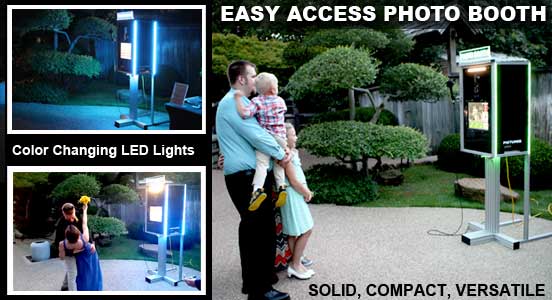
Buy Easy Access Photo Booth for your Photo Booth Business
The Easy Access Photo Booth is compact and has a small foot print but packs a punch with its versatile usage options.
The Easy Access Photo Booth looks great and can fit practically anywhere (indoor/outdoor) because of its sleek and compact design.
Buy A Photo Booth